Distributed systems
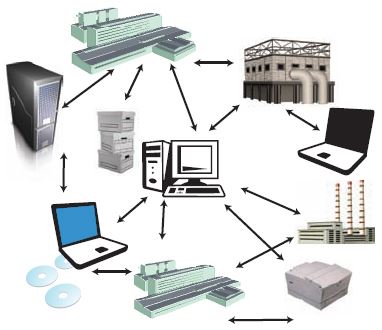
A distributed system is a network that consists of autonomous
computers that are connected using a distribution middleware. They help in
sharing different resources and capabilities to provide users with a single and
integrated coherent network.
Distributed
computing is a computing concept that, in its most general sense, refers to
multiple computer systems working on a single problem. In distributed
computing, a single problem is divided into many parts, and each part is solved
by different computers. As long as the computers are networked, they can
communicate with each other to solve the problem. If done properly, the
computers perform like a single entity. The ultimate goal of distributed computing is to maximize performance by connecting users and IT resources in a cost-effective, transparent and reliable manner. It also ensures fault tolerance and enables resource accessibility in the event that one of the components fails.
Operating system is developed to
ease people daily life. For user benefits and needs the operating system may be
single user or distributed. In distributed systems, many computers connected to
each other and share their resources with each other. There are some advantages
and disadvantages of distributed operating system that we will discuss.
Advantages of distributed operating
systems:-
- Give more performance than single system
- If one pc in distributed system malfunction or corrupts then other node or pc will take care of
- More resources can be added easily
- Resources like printers can be shared on multiple pc’s
Disadvantages of distributed
operating systems:-
- Security problem due to sharing
- Some messages can be lost in the network system
- Bandwidth is another problem if there is large data then all network wires to be replaced which tends to become expensive
- Overloading is another problem in distributed operating systems
- If there is a database connected on local system and many users accessing that database through remote or distributed way then performance become slow
- The databases in network operating is difficult to administrate then single user system
Elements of
distributed systems
· 1. Processing components.
· 2. Data networks
for components to communicate.
· 3. Including the components who are dedicated
for processing the
communication called connectors.
· 4. Data stores (data bases) and Data.
· 5.The configuration of the above elements
Communication in distributed systems is always based on
low-level message passing as offered by the underlying network. Expressing
communication through message passing is harder than using primitives based on
shared memory, as available for non-distributed platforms. Modern distributed
systems often consist of thousands or even millions of processes scattered
across a network with unreliable communication such as the Internet. Unless the
primitive communication facilities of computer networks are replaced by
something else, development of large-scale distributed applications is
extremely difficult.
we start by discussing the rules that communicating
processes must adhere to, known as protocols, and concentrate on structuring
those protocols in the form of layers. We then look at three widely-used models
for communication: Remote Procedure Call (RPC), Message-Oriented Middleware
(MOM), and data streaming. We also discuss the general problem of sending data
to multiple receivers, called multicasting.
Distributed
systems architectures
· *
Client-server architectures
· *
Distributed services
which are called
on by clients. Servers
that provide services
are
treated differently from clients that use
services.
· * Distributed object architectures
· * No distinction between
clients and servers.
Any object on the system may
provide and use services from other objects.
Micro services Architecture
The idea is to
split your application into a set of smaller, interconnected services instead
of building a single monolithic application. Each micro service is a small
application that has its own hexagonal architecture consisting of business
logic along with various adapters. Some micro services would expose a REST, RPC
or message-based API and most services consume APIs provided by other services.
Other micro services might implement a web UI.
The Micro
service architecture pattern significantly impacts the relationship between the
application and the database. Instead of sharing a single database schema with
other services, each service has its own database schema. On the one hand, this
approach is at odds with the idea of an enterprise-wide data model. Also, it
often results in duplication of some data. However, having a database schema per
service is essential if you want to benefit from micro services, because it
ensures loose coupling. Each of the services has its own database. Moreover, a
service can use a type of database that is best suited to its needs, the
so-called polyglot
persistence architecture.
Some APIs are
also exposed to the mobile, desktop, web apps. The apps don’t, however, have
direct access to the back-end services. Instead, communication is mediated by
an intermediary known as an API
Gateway. The API Gateway is responsible for tasks such as
load balancing, caching, access control, API metering, and monitoring.
What is MVC
In this
tutorial, we can discuss more about MVC and advantages and
disadvantages of mvc. MVC stands for Model–view–controller. It is a
software architectural pattern for implementing user interfaces on computers.
It divides a given software application into three interconnected parts, so as
to separate internal representations of information from the ways that
information is presented to or accepted from the user.
1) Model: It specifies the
logical structure of data in a software application and the high-level class
associated with it. It is the domain-specific representation of the data which
describes the working of an application. When a model changes its state, domain
notifies its associated views, so they can refresh.
2) View: View component is
used for all the UI logic of the application and these are the components that
display the application’s user interface (UI). It renders the model into a form
suitable for interaction. Multiple views can exist for a single model for
different purposes.
3) Controller: Controllers
act as an interface between Model and View components. It processes all the
business logic and incoming requests, manipulate data using the Model
component, and interact with the Views to render the final output. It receives
input and initiates a response by making calls on model objects
Disadvantages of MVC
1) Increased complexity
2) Inefficiency of data access in
view
3) Difficulty of using MVC with
modern user interface.
4) Need multiple programmers
5) Knowledge on multiple
technologies is required.
6) Developer have knowledge of
client side code and html code.
Difference between RPC and RMI
RPC and RMI are the mechanisms which
enable a client to invoke the procedure or method from the server through
establishing communication between client and server. The common difference
between RPC and RMI is that RPC only supports procedural programming
whereas RMI supports object-oriented programming.
Another major difference between the
two is that the parameters passed to remote procedures call consist of ordinary
data structures. On the other hand, the parameters passed to remote method
consist of objects.
What is the difference between RPC and RMI?
• RPC is language neutral while RMI is limited to Java.• RPC is procedural like in C, but RMI is object oriented.
• RPC supports only primitive data types while RMI allows objects to be passed as arguments and return values. When using RPC, programmer must split any compound objects to primitive data types.
• RMI is easy to program that RPC.
• RMI is slower than RPC since RMI involves execution of java bytecode.
• RMI allows usage of design patterns due to the object oriented nature while RPC does not have this capability.
What CORBA Brings to web-based systems
Augmenting the World Wide Web infrastructure with CORBA provides three immediate benefits. First, it gets rid of the CGI bottleneck on the server. Second, it provides a scalable and robust server-to-server World Wide Web infrastructure. Third, it extends Java with a distributed object infrastructure. A brief explanation follows.CORBA avoids the CGI bottleneck. It lets clients directly invoke methods on a server. The client passes the parameters using precompiled stubs, or it generates them on-the-fly using CORBA's dynamic invocation services. In either case, the server receives the call directly through a precompiled skeleton. You can invoke any IDL-defined method on the server, not just the ones defined by HTTP. In addition, you can pass any typed parameter instead of just strings. This means there's very little client/server overhead, especially when compared with HTTP/CGI. With CGI, you must start a new instance of a program every time an applet invokes a method on a server; with CORBA, you don't. Additionally, the CGI does not maintain the state between client invocations; CORBA does.
CORBA provides a scalable server-to-server infrastructure. Pools of server business objects can communicate using the CORBA ORB. These objects can run on multiple servers to provide load balancing for incoming client requests. The ORB can dispatch the request to the first available object and add more objects as the demand increases. CORBA lets the server objects act in unison, using transaction boundaries and related CORBA services. In contrast, a CGI application is a bottleneck because it must respond to thousands of incoming requests; it cannot distribute the load across multiple processes or processors.
CORBA extends Java with a distributed object infrastructure. Currently, Java applets cannot communicate across address spaces using remote method invocations. This means that there is no easy way for a Java applet to invoke a method on a remote object. CORBA lets Java applets communicate with other objects written in different languages across address spaces and networks. In addition, CORBA provides a rich set of distributed object services that augment Java-including metadata, transactions, security, naming, trader, and events.
Extensible Markup Language (XML) is
a text-based format that allows for the structuring of electronic documents and
is not limited to a set of labels. XML is used to describe data. The XML
standard is a flexible way to create information formats and electronically
share structured data via the public Internet, as well as via corporate
networks. It is extensible because it is not a fixed format like HTML (which is
a single, predefined markup language). Instead, XML is a metalanguage — a
language for describing other languages — which lets you design your own
markup languages for limitless different types of documents. XML can do this
because it's written in SGML, the international standard metalanguage for text
document markup (ISO 8879). (About 1990, Tim Berners-Lee at CERN developed a
new, simpler language that could be used in place of SGML. Thus was born HTML
or "Hyper Text Markup Language." It was intended to be a simpler
language that did not require expensive authoring tools. HTML succeeded beyond
anyone's expectations but it lacked a certain flexibility that developers
wanted. Various groups made changes and added extensions until HTML's roots had
been mangled. In the summer of 1996, a working group at W3C was formed to
create a markup language that would combine the strength of SGML with the
simplicity of HTML. The first official draft specification for XML was released
in November 1996. XML version 1.0 became a W3C recommendation in 1998.)
The basic structure of XML is the
document. This terminology, however, might cause one to think of XML as only a
richer, more flexible HTML. It is richer and more flexible, but it can be so
much more as well. Thinking of XML as a document allows you to see how it can
be used for presentation of data. This presentation can be detailed and useful.
Most browsers now handle XML for presentation. XML does, however, go beyond
documents. It can be used for the communication of data as well. XML uses a
flexible tagged structure that makes it more robust than a fixed record format
for communication.
Common uses for XML
include:
- Information identification -- You can define your own markup, so you can define meaningful names for all your information items.
- Information storage -- Because XML is portable and non-proprietary, it can be used to store information across any platforms. Because it is backed by an international standard, it will remain accessible and processable as a data format.
- Information structure -- XML structures can ‘nest’, so they can be used to store and identify any kind of hierarchical information, especially long, deep, or complex document sets or data sources, which makes it ideal for an information-management back-end to serving the Web. This is one if its most common Web applications, with a transformation system to serve it as HTML.
- Publishing -- The original goal of XML was "to enable generic SGML to be served, received, and processed on the Web in the way that is now possible with HTML." Combining the three previous topics (identity, storage, and structure) means it is possible to get all the benefits of robust document management and control (with XML) and publish to the Web (as HTML) as well as to paper (as PDF) and to other formats (e.g., Braille, Audio, etc) from a single source document by using the appropriate stylesheets.
- Messaging and data transfer -- XML is also very heavily used for enclosing or encapsulating information in order to pass it between different computing systems which would otherwise be unable to communicate because of their proprietary or secret data formats. By providing a lingua francafor data identity and structure, XML provides a common ‘envelope’ for inter-process communication (messaging).
- Web services -- Building on all of these, as well as its use in browsers, machine-processable data can be exchanged between consenting systems, where before it was only comprehensible by humans (HTML). Weather services, e-commerce sites, blog newsfeeds, and other data-exchange services, like smartphone apps, use XML for data management and transmission, and the Web browser or app for display and interaction.
Are XML, SGML, and HTML all the same
thing? Not exactly. SGML may be viewed as the "mother tongue," and it
has been used for describing thousands of different document types in many
fields of human activity, from transcriptions of ancient manuscripts to
technical documentation for stealth bombers, and from patients' medical and
clinical records to musical notation. However, SGML is a large and complex
language. XML is an abbreviated version of SGML, designed to make it easier to
use over the Web, easier to define document types, and more amenable to
programming requirements. It omits all the complex and lesser-used options of
SGML in return for the benefits of being easier to write applications for,
easier to understand, and more readily suited to delivery and interoperability
over the Web. Similarly, HTML, XHTML, and HTML5 may be viewed as are the XML
applications most frequently used on the Web.

Comments
Post a Comment